Neutopia is a new platform built to nurture community engagement, especially within the learning and development space. It supports a diverse group of clients, including forward-thinking organizations, changemakers, leaders, educators, and entrepreneurs. While Neutopia empowers community admins to create content, promote events, and share resources, there was a need for more intuitive tools to help admins learn from past campaigns. A simpler way to reflect on previous efforts and streamline content creation was missing but essential for fostering stronger community engagement.
UX Role:
End-to-End UI/UX Designer collaborating with a Senior Designer and Product Team
Mission:
Empower community admins by integrating AI-driven tools and smart features to enhance content creation, improve engagement, and provide actionable insights.
Timeline:
July 2024 - Sept 2024
Key problems to solve:
How might we-
"provide community admins with real-time, actionable insights to help them make data-driven decisions quickly and effectively?"
"simplify the content creation process for admins without design experience, while ensuring that the content produced remains visually appealing and impactful?"
"leverage AI to automate and streamline repetitive tasks, empowering admins to focus on community engagement and high-level strategies?"
Challenges I encountered:
Understanding Admin Needs:
Initially, it was challenging to fully grasp the diverse needs of community admins, especially in terms of how they interact with data and what specific insights would help them optimize their performance.
Balancing Simplicity and Functionality:
Another challenge was finding the right balance between simplifying the content creation process for non-designers while still offering enough functionality to create engaging, high-quality content.
Integrating AI Effectively:
While the goal was to leverage AI for content creation and task automation, integrating these features in a way that felt seamless and intuitive for admins required careful consideration.
Delving deeper into the process…
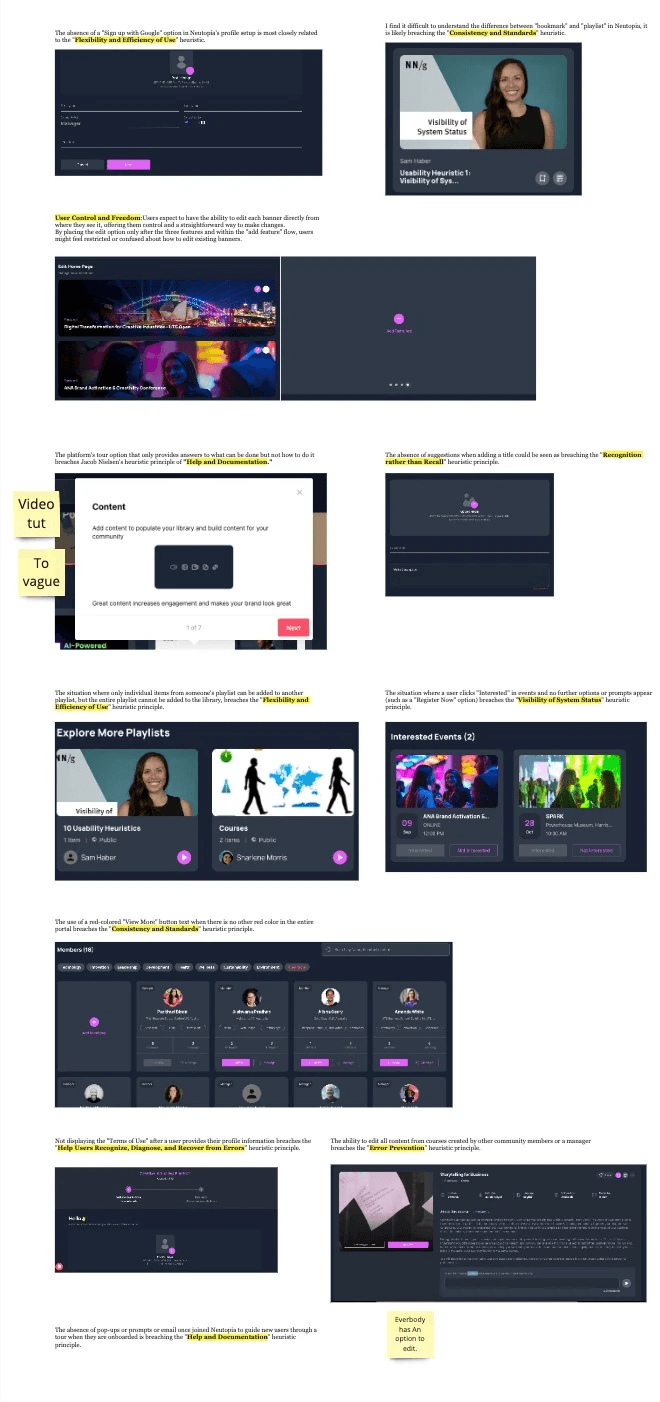
Heuristic Analysis
To begin with, we conducted a heuristic analysis to identify usability issues and areas for improvement within the platform. This helped us understand the current user experience and evaluate how effectively the platform was meeting the needs of community admins. By applying established usability principles, we pinpointed gaps in functionality, navigation, and ease of use, laying the groundwork for informed design decisions moving forward.
Competitive Analysis
As part of my design process, I performed a competitive analysis of platforms like Kajabi, Circle, Mighty Networks, the tribe, Thinkific to explore how they handle community building, content creation, and user engagement. I also examined platforms like Sana AI and Canva for AI integration inspiration.By examining their strengths and weaknesses, I uncovered valuable insights and opportunities for innovation. To highlight this, I’ve included some screenshots from some platforms showcasing a feature I found particularly effective. These features served as inspiration for my design solutions, allowing me to integrate best practices while addressing specific needs in Neutopia’s user experience.
In-depth Interviews
The interview method was used to deeply understand user needs and expectations , providing valuable insights and feedback. This helped shape the product's functionality, improve existing features , and suggest new ones.
8 Respondents
Group Age- 23 years- 55 years


The solution phase…
Usability Testing…
Conducting usability evaluations is crucial for guaranteeing a product's ease of use. I've validated my interface with five participants from Neutopia, whose information was supplied by our client, Neutopia, and three of my personal acquaintances.
5 key insights…
01
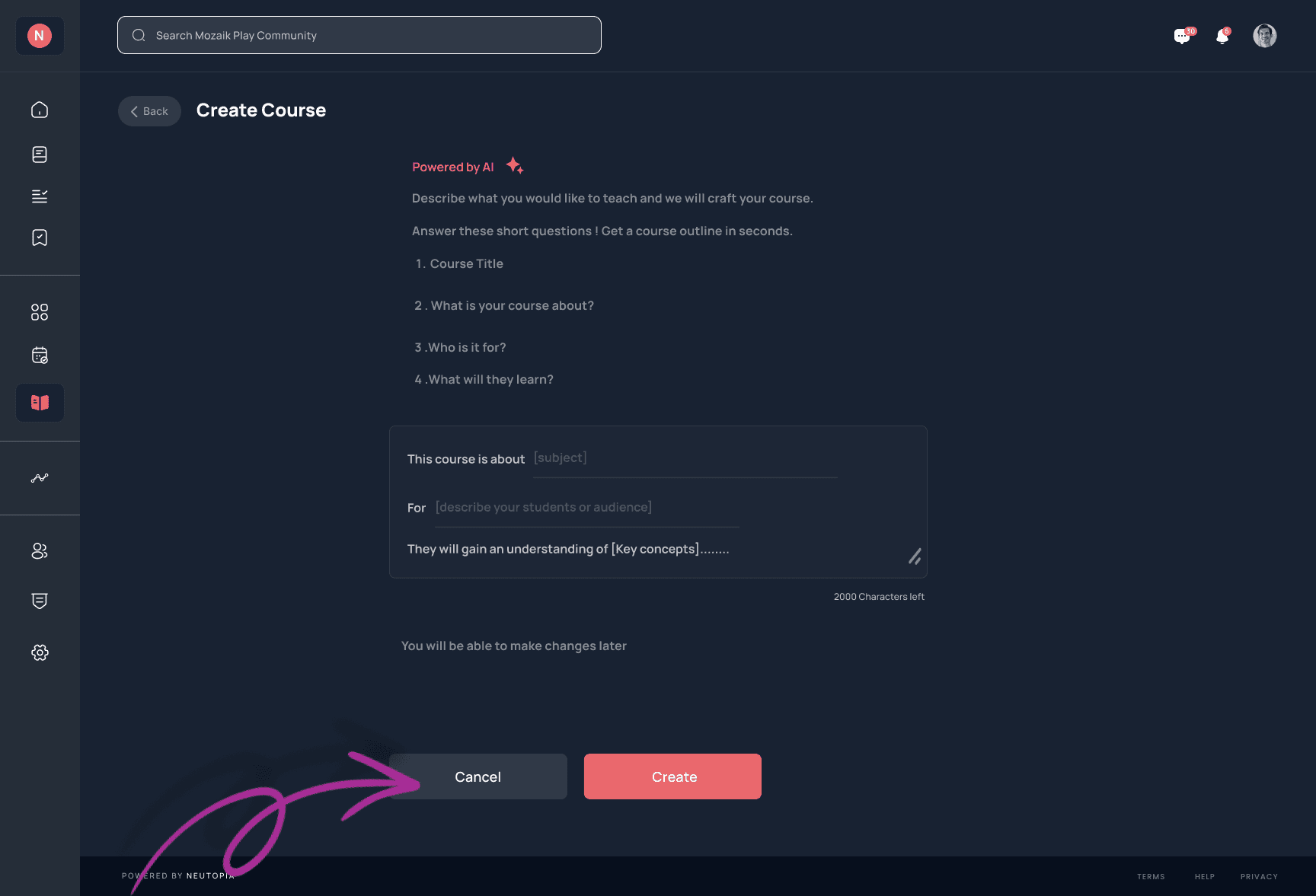
Skip Button
While users appreciated the AI-powered tools, five of them expressed a desire to skip the AI outline generator and create content manually. This feedback encouraged me to add a skip button.
02
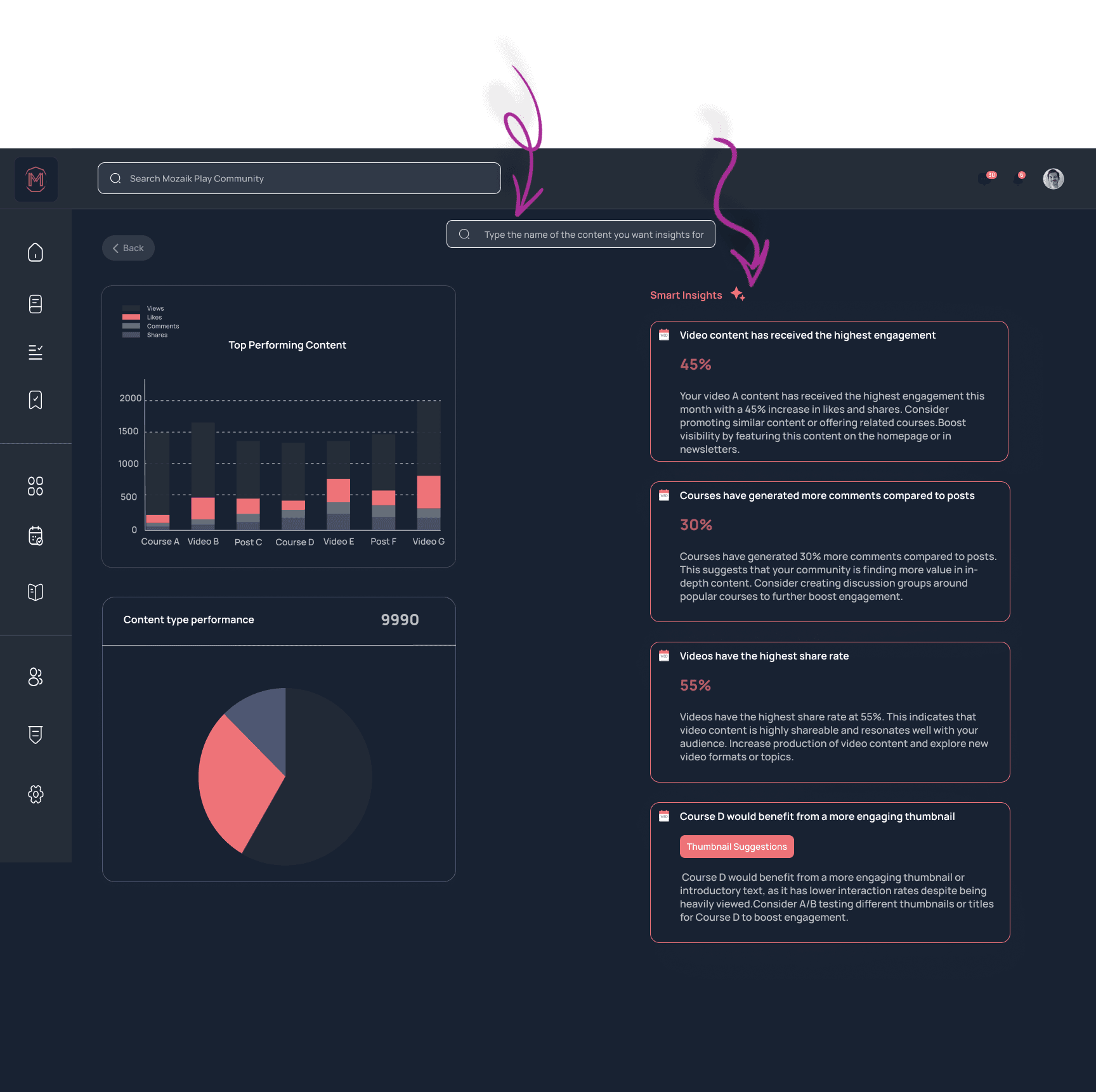
Smart Insights visibility
Despite incorporating smart insights into the metrics solution, 4 users did not notice or engage with this feature. This feedback highlighted the need to make these insights more visible and intuitive within the design.
03
Dual search functionalities
5 users were confused by the presence of two search bars—one for analytics and another in the main header of Neutopia. Based on this insight, we streamlined the interface by combining the search functionalities for improved clarity and ease of use.
03
Demographic Filters
3 Users requested demographic filters in the analytics dashboard , enabling better audience insights and more tailored content strategies.
04
Share and Download Button for Metrics
4 users also requested the ability to easily share and download metrics. They needed a way to export data reports in various formats (e.g., PDF, CSV) to share with team members or stakeholders.
The design decisions…
As a UI/UX designer, my focus was on three key aspects: analytics, content creation, and gamification. However, after considering Neutopia's structure—where only community members can access specific features—I decided not to prioritize gamification. I felt it wouldn't significantly enhance engagement since the closed community model already fosters interaction within a defined group. Instead, I emphasized improving the analytics and content creation tools, which I believe would deliver more value in driving user engagement and platform success.
The design…
I created designs for both mobile and web platforms, ensuring a seamless experience across devices. I went through multiple iterations before arriving at the final solution, refining the design based on feedback and testing to ensure it effectively met user needs and delivered a smooth experience.
01 Challenge:
Starting a course outline can feel overwhelming and time-consuming for community admins.
Solution:
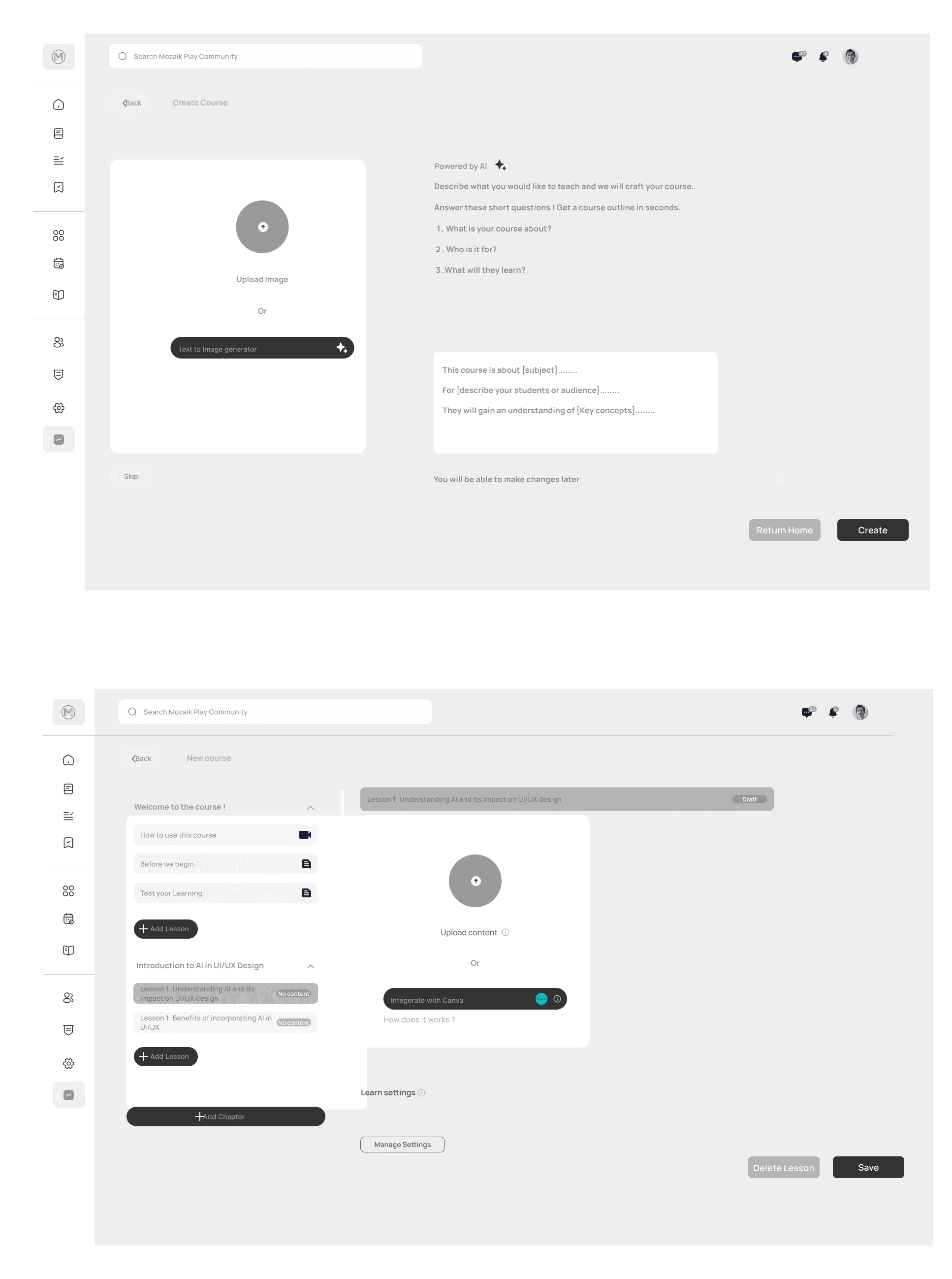
To solve this, I developed the AI Course Outline Generator integrated directly into the platform. This allows admins to input key course details and receive tailored outlines, all without needing third-party tools. For those seeking more control, a “Skip” button enables them to bypass the structure. This solution empowers admins to focus on delivering impactful learning experiences while saving time and boosting creativity.
02 Challenge:
Admins often found themselves struggling to create visually engaging thumbnails in a short amount of time. The tools were either too complex or didn’t offer the kind of quick, creative guidance they needed.
Solution:
To solve this, I redesigned the thumbnail creation process with simplicity at its core. Now, admins can easily upload or create thumbnails with built-in AI-powered suggestions and a seamless Canva integration right inside the platform. The AI offers real-time insights, like suggesting color contrast improvements or element repositioning, making the process feel effortless. This way, admins can focus on crafting compelling visuals without the stress, knowing they’re optimizing for better engagement while saving valuable time.
03 Challenge:
Admins often struggle with the creative load of writing course descriptions, making it challenging to produce engaging content quickly.
Solution:
To solve this, I designed a course description page inspired by "Canvas Magic Write." When admins select any text, a formatting toolbar appears, along with an AI icon. By clicking the icon, admins can generate suggestions from scratch or choose options to rewrite, condense, or enhance their existing content. This feature streamlines the writing process, allowing admins to either create or refine descriptions with ease while maintaining creative control.
04 Challenge:
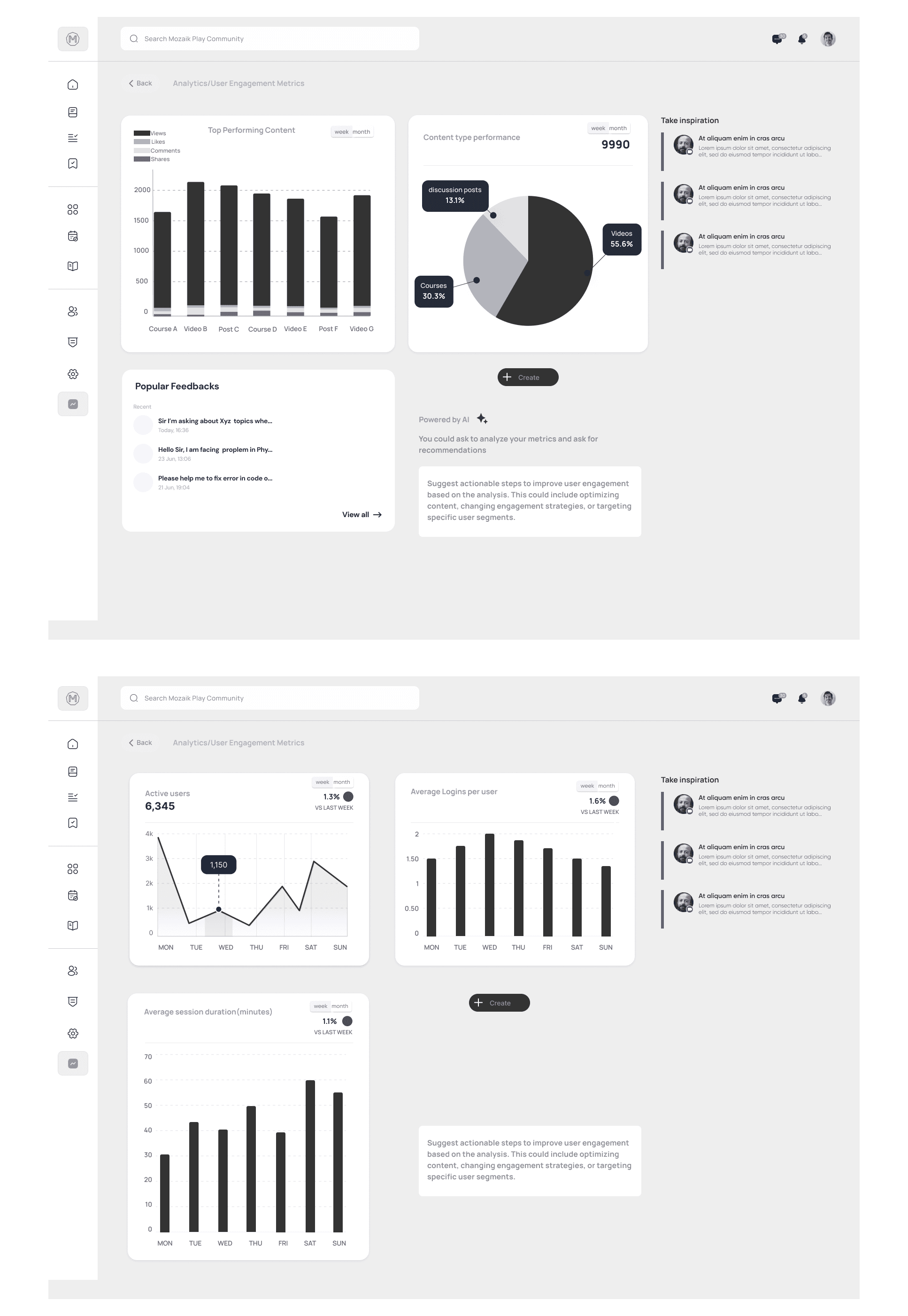
Admins lacked the tools to reflect on past campaigns and gain insights efficiently. They needed a quick way to assess core performance without sifting through complex data.
Solution:
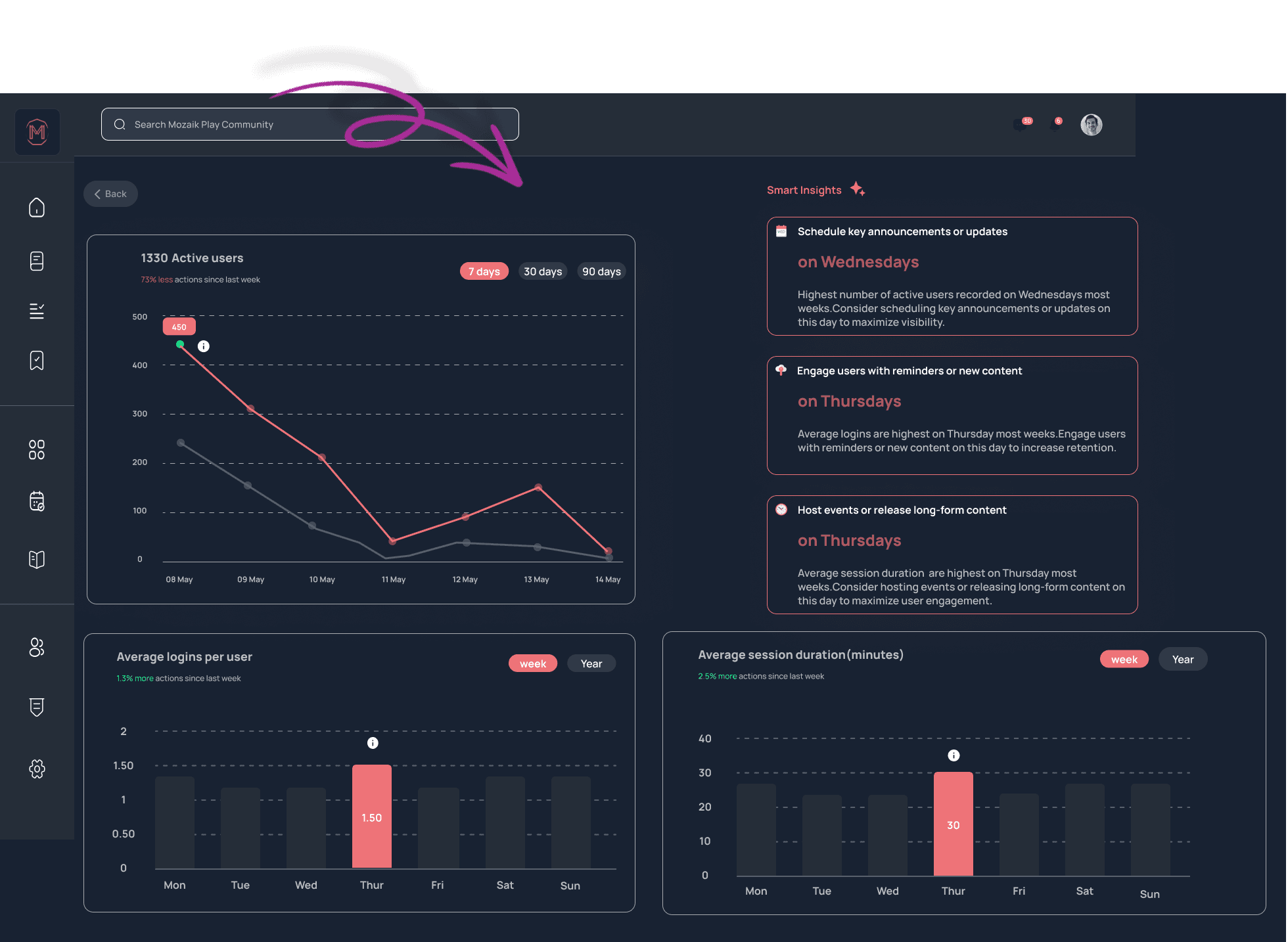
To solve this,I designed an analytics dashboard that provides a concise overview of key metrics with an option to "View Detailed Metrics" for those seeking more in-depth analysis. Alongside conventional analytics, the dashboard integrates innovative tools like thumbnail performance tracking and sentiment analysis, helping admins gain a clearer picture of their content's effectiveness.These metrics include filters, as well as options to share and download insights from usability testing.
To further enhance the experience, I integrated AI-powered Smart Insights. I redesigned the smart insights into flexible card that users can resize according to their needs and changed the card UI (insight from usability testing)nto make it more prominent. This allows for easy viewing of important insights while maximizing screen space. Users can slide the card to the right when they don’t need them, keeping the interface clean and focused on their tasks.
AI insights enhance user engagement by providing real-time, data-driven recommendations for content strategies. They personalize the experience, save time on analysis, and improve user satisfaction. By identifying trends and offering tailored advice, AI fosters continuous improvement, empowering community admins to optimize their content effectively.
Overview
